
Free AI Resume Builder • ATS-Friendly • No Sign-Up Required
Build ATS-Friendly Resumes That Get More Interviews
Create professional resumes, rewrite resume content, generate cover letters, compare your resume against job descriptions, and download polished PDF or DOCX files in minutes.
Popular Career Tools
Use free AI tools to improve your resume, cover letter, and job application strategy.
AI Resume Builder
Create an ATS-friendly resume with AI-powered sections.
Open Tool →
Resume Rewrite
Rewrite weak resume text into professional bullet points.
Open Tool →
Cover Letter Generator
Generate job-ready cover letters in minutes.
Open Tool →
Resume Tips Blog
Learn resume, ATS, interview, and job application tips.
Open Tool →
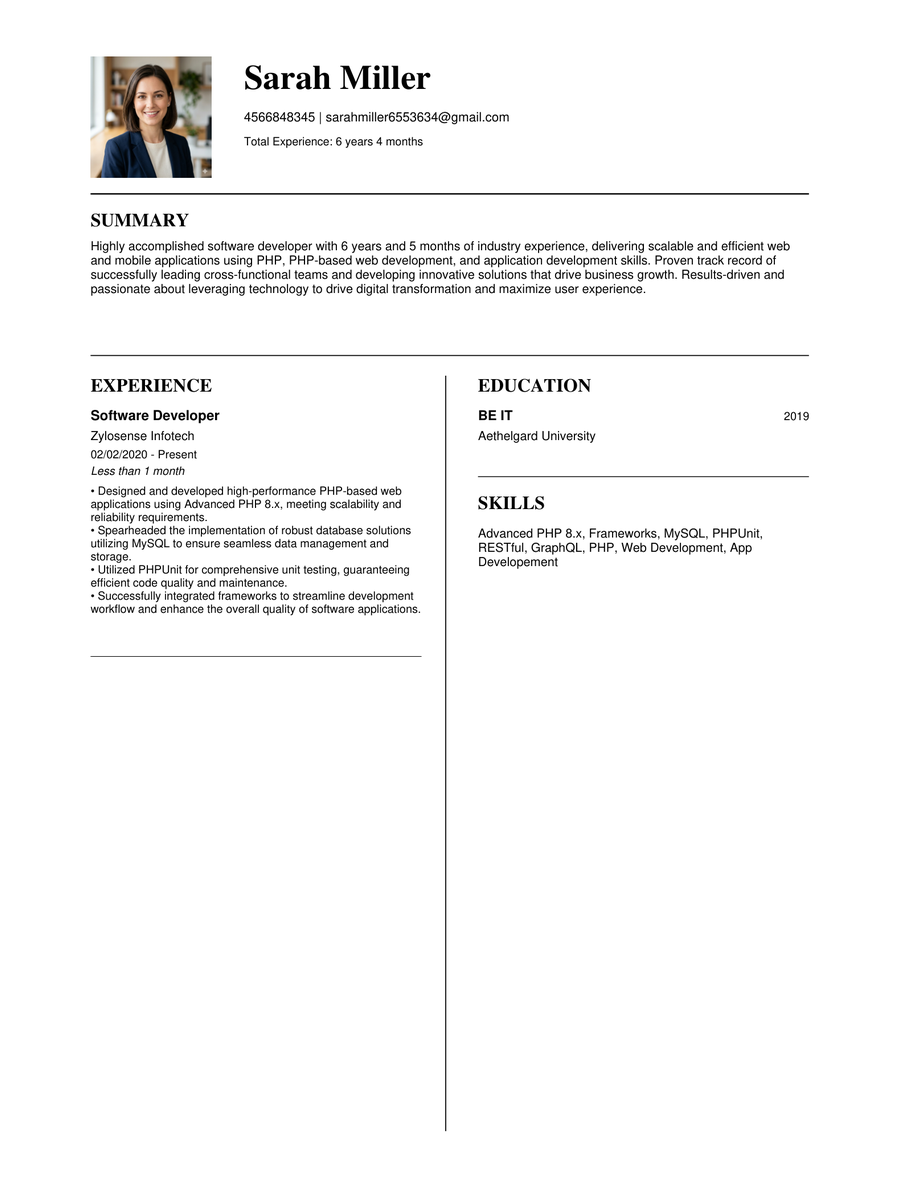
Sample Resume
View a professional ATS-friendly resume example.
Open Tool →
Resume & Career Advice
Latest Resume Tips
Learn how to create ATS-friendly resumes, improve keywords, write better summaries, and avoid common resume mistakes.
Create Your Resume
Fill your details, use AI tools, preview your resume, then download it as PDF or DOCX.
Resume Template
👤 Personal Information
Add your basic details for the resume header.
💼 Work Experience
Add your job roles, companies, and employment dates.
⚡ AI Experience Bullet Generator
Generate professional achievement bullets and automatically add skills.
🎓 Education
Add your degree, university, and graduation year.
🛠 Skills
Add important skills that match your target job.
✨ AI Summary Generator
Generate a professional resume summary using your role, skills, and real work experience.
Your Name
Professional Summary
Your professional summary will appear here.
Work Experience
Skills
Education
📊 Resume Match Score
Compare your resume with a job description and get ATS match feedback.
For the most accurate score, complete your resume details first: summary, skills, work experience, and education. Then paste the full job description below.
Add your resume details first for a more accurate score.
🚀 AI Resume Optimizer
Match your resume to a job description and discover missing keywords, skills, and ATS improvements.
Why Choose ResumeForge Plus?
ResumeForge Plus is built for job seekers who want a faster, simpler way to create professional, ATS-friendly career documents without signing up or paying before getting started.
Built for ATS Screening
Use clean templates, keyword-focused sections, and job description matching to improve your chances of passing resume screening.
AI-Powered Writing Help
Generate resume summaries, improve bullet points, rewrite weak resume text, and create cover letters using AI assistance.
Preview Before Download
Review your resume in live preview and fullscreen print preview before downloading a PDF or DOCX file.
Free and Simple to Use
Start building your resume without registration. Create, edit, preview, and download your resume directly from your browser.
Ready to Build a Better Resume?
Create an ATS-friendly resume, improve your content with AI, and download a professional PDF or DOCX file in minutes.
Start Free Resume BuilderHow ResumeForge Plus Works
Create a professional ATS-friendly resume in just four simple steps using AI-powered career tools.
Enter Your Details
Add your personal information, work experience, education and skills.
Let AI Help
Generate summaries, improve experience, rewrite resumes and create cover letters instantly.
Choose a Template
Select from multiple ATS-friendly resume templates for your profession.
Download & Apply
Download your resume as PDF or DOCX and start applying with confidence.
Why Choose ResumeForge Plus?
✅ ATS-Friendly
Designed to pass Applicant Tracking Systems used by employers.
🤖 AI Powered
Generate summaries, cover letters, experience descriptions and resume rewrites.
📄 PDF & DOCX
Download resumes in professional PDF and editable DOCX formats.
🔒 No Login Required
Create resumes instantly without creating an account.
🎨 Multiple Templates
Modern, Executive, Tech Professional and ATS Professional templates.
⚡ Fast & Easy
Build a professional resume in minutes with an intuitive interface.
💯 Free to Start
Access powerful resume-building features without paying upfront.
🌍 Built for Everyone
Perfect for students, freshers, professionals and career changers.
Frequently Asked Questions
Is ResumeForge Plus free?
Yes. ResumeForge Plus allows you to create ATS-friendly resumes, generate AI content, and download resumes without creating an account.
Do I need to create an account?
No. You can build, edit, and download your resume without signing up or logging in.
Are the resume templates ATS-friendly?
Yes. All templates are designed to work well with Applicant Tracking Systems used by employers and recruiters.
Can I download my resume as PDF?
Yes. You can download your completed resume as a professional PDF ready for job applications.
Can I download my resume as DOCX?
Yes. ResumeForge Plus also supports Microsoft Word DOCX downloads for easy editing.
Can I create a cover letter?
Yes. The AI Cover Letter Generator creates personalized cover letters based on your experience and target job.
Does ResumeForge Plus use AI?
Yes. AI helps generate resume summaries, improve work experience descriptions, rewrite resume content, and create cover letters.
Can experienced professionals use ResumeForge Plus?
Absolutely. ResumeForge Plus is suitable for experienced professionals and career changers.
Is ResumeForge Plus suitable for freshers?
Yes. Students and fresh graduates can create ATS-friendly resumes even without prior work experience.
Can I rewrite my existing resume?
Yes. The AI Resume Rewrite tool improves grammar, wording, readability, and ATS compatibility.
Can I compare my resume with a job description?
Yes. The Resume Match Score tool compares your resume with a job description and provides improvement suggestions.
Does ResumeForge Plus offer multiple templates?
Yes. You can choose from Modern, Executive, Tech Professional, ATS Professional, and other resume templates.
Is my personal information stored?
No. ResumeForge Plus allows you to create resumes without requiring an account, helping keep your information under your control.
Which industries does ResumeForge Plus support?
ResumeForge Plus works for software developers, marketers, designers, SEO professionals, business professionals, students, healthcare workers, and many other careers.
Can I edit my resume after generating it?
Yes. You can edit any section of your resume at any time before downloading the final PDF or DOCX.
Is ResumeForge Plus mobile-friendly?
Yes. ResumeForge Plus is responsive and works on desktop, tablet, and mobile devices.